Helping Retention Teams Make Better Pricing Decisions
Understanding Retention Advocates' workflow and building a system that helps them track merchant's accounts and offer the best deals.
My Role
UX Designer
Company
Global Payments
Design Principle
Assist, Don't Dictate
Year
2025 - Present

OUTPUT
OUTCOME
IMPACT
Currently, a group of salespeople made their edits on existing spreadsheets of groups of merchant accounts and switched between different tabs to obtain their desired results.
01
Advocate will gain an understanding of the current state of the merchant and their history of card processing, as well as any additional products and services they buy from us.
02
Determine concession offer to merchant
Using the merchant details and historical info, the retention advocate evaluates the available rate change options using an interactive calculator and pricing intelligence logic provided by PWC.
The advocate then consults the merchant to discuss their account, review their pricing, discuss different strategies the merchant can implement for reduced costs, and offer any reductions available to them.
03
Submit agreed upon pricing to CRMs for implementation
When the merchant agrees to the new pricing offered, the Retention Advocates will be able to submit that info directly from the UI to the CRM they use to track their work.
Disconnected processes, inefficient pricing proposals and slow approvals.
Due to having individual workflows and sheets that each salesperson worked on, processes were disconnected and messy. Each user setup their own workflows and the reasoning often got lost.
The obvious solution was to create a platform that would serve as the go-forward solution for retention teams across the entire Global Ecosystem, focusing on specific talking points with customers, thus resulting in lower overall attrition and more long-term relationships with our existing customer base.
This required constant communication and workshops with the retention team to figure out a process and template for salespeople to follow.
Calculating Totals for chain accounts is very time-consuming and error-prone.
Through user interviews with the sales teams and stakeholder interviews with the Product Manager, Business Analyst and Product Owner, a major theme emerged.
A large majority of our customers were merchants with financial accounts spanning multiple locations. Each location is mapped to an individual Merchant ID which comes together as a Chain Account. Every parameter of a MID is mapped to variables dependent on one another. These pricing dependencies reflect in totals based on which approvals are requested.
Audit existing workflow and noted all the bottlenecks in the process
Mapped out a Ishikawa Diagram to understand the different sections contributing to bottlenecks
Answered each bottleneck in the section using the 5Whys Approach
Iterated and designed each moment to produce an uninterrupted flow.
Multiple Problems. Four Major Themes. Focus on the details, the whole takes care of itself.

Four moments, one uninterrupted flow.
Here's the journey a salesperson actually walks, from reviewing merchant account information on their home screen to formulating the best deal for merchants. Each moment was designed to remove a specific hesitation.
01
Discover : Multiple Account Relationships
Users search for the merchant account based on the filter information.
02
Discover : Multiple Account Relationships
Users search for the merchant account and prime themselves before pulling up the information.
Excel opened up rows and columns of information head on for users. The first page had to feel like an introduction to user, not something to get immediately working on. I created an inetrmediary page to acquaint the user with the account information to prime them for what's to come.
Moments of hesitation, vast unconnected information
During diary studies with users, I noticed moments of hesitation and stress when the first excel sheet opened. Rows and rows of information lined up on their sheets and they speedily began to switch between sheets, studying information and applying them.
01
Salespeople are confused due to no differentiation between hundreds of templated accounts and lack of grouping based on account characteristics.


Excel opened up rows and columns of information head on for users. The first page had to feel like an introduction to user, not something to get immediately working on. I created an inetrmediary page to acquaint the user with the account information to prime them for what's to come.
02
Salespeople are going through hundreds of accounts daily. The need of the hour is for them to get a quick summary of the account they are reviewing and the main point is to have a conversation with customers.
I organized a workshop with users (salespeople) and categorized all elements based on user feeedback and created a solid structure and information architecture for the information.

03
i got down to exploring three ideas before zeroing in on what approach to take.
I selected Progressive Disclosure because it balanced efficiency for experienced users with clarity for new users, while scaling to increasingly complex account structures.

01
A huge dashboard showing every account
Pros
Everything visible - user can go into different sections (categories) based on the information needed
Cons
Overwhelming, a lot of information displayed
02
A Wizard guiding the user step by step
Pros
Guided
Minimal Mistakes
Cons
Slow for expert users
03
Progressive Disclosure, priming the user
Pros
Low cognitive load
Supports experts
Faster
Cons
Slightly more interaction
04
Task-Based Card Sorting
Once users navigated to the account they further wished to explore, account information was grouped and displayed in a card-based format for further discovery.

Displaying account parameters for Individual and Chain Accounts.
Out of all the tasks that users carried out, parameter-finding was the most important and time consuming.
Since all actions are carried out on these parameters which are dependent on each other, it was important that users viewed all the information simultaneously before making an informed decision.
01
Account parameters are tricky. Especially for chain accounts. Account parameters for multiple chains can be changed and the resulting totals must be reflected.


02
displaying individual account parameters is rather straightforward. A grid-like format and work was done. For rows of MIDs belonging to the same chain required more brainstorming.
01
Search-first
Let users directly search for the parameter they need.
What are you looking for? [ Search account information... ] -> Relevant parameters
• Parameter A • Parameter B • Parameter C -> Parameter C
Pros
Reduces the need to scan a large dataset and is particularly useful when users already know what they're looking for.
Cons
Assumes users know the parameter's name or terminology. If they don't know which parameter they need, search doesn't solve the underlying decision problem.


02
Task-based filtering
Instead of showing every account attribute, first ask what the user is trying to accomplish.
What do you want to calculate? -> [ Chain Account Total ] -> Relevant account parameters • Account hierarchy • Pricing structure • Contract • Account status
How it helps:
Transforms the problem from:
"Which of these 50 parameters do I need?"
into:
"Which of these 5 parameters are relevant to my task?"
Limitation:
Users wanted something that supplemented their workflow, not take over
Limites flexibility and freedom
03
Column Filtering System
After showing every account attribute, the user can use the filter option to narrow down columns in the table
Account Info Table -> Columns Filter -> Deselect Columns -> Scroll through the parameters
Pros:
Flexibility based on cognitive capabilities
Limitation:
Requires specialized knowledge


04
Guided selection
Turn parameter selection into a sequence of contextual decisions.
What type of account? -> What pricing relationship?
-> Which account level? -> Recommended parameter
How it helps:
The system narrows the possibilities based on previous selections, reducing the number of decisions the user has to make at once.
Limitation:
Can feel restrictive or slow for experienced users who already know exactly what they need.
Introduces a new problem of having to select the merchant accounts the user wants the changes to be applied to.
Have to rely on muscle memory rather than making an informed decision based on given information
Possibility of parameters remain hidden

03
Different Layouts. Different Account Types.
For quicker recognition and easier editting, individual and chain merchant accounts were intentionally visually differentiated. It allowed for quicker recognition of account type and corresponding deals given required comparitively lesser cognitive load.


The entire website structure. I put emphasis on the individual and chain account since the primary decisions relating to merchants were to be made when deciding for account size and structure.
Simultaneous edits and calculations to ensure the best deals and discounts
Calculating for individual account pricing carried almost no complexity. Users entered the edits on the go, determined the totals and could confirm with merchants.
Chain Accounts carried a different kind of complexity. With MIDs ranging in the hundreds, it was important for salespeople to trial-and-error deals with differents MIDs before arriving at a conclusion. This could result in multiple sheets that they needed to compare against.
01
Salespeople wanted to be able to make changes to individual locations as well as multiple locations to individual parameters. However, multiple and simultaneous changes often left multiple fields of different values to be noted and sent to the merchant.
I introduced three flows within the bulk edit feature to make the process smoother.
01
Shifting interdependence logic to a more viewable area.
02
Allowing only one changed value to be applied to several fields in a single parameter per bulk edit page. This keeps all logic organized and easily accessible.
03
Introducing Pages. Multiple Bulk Edits.
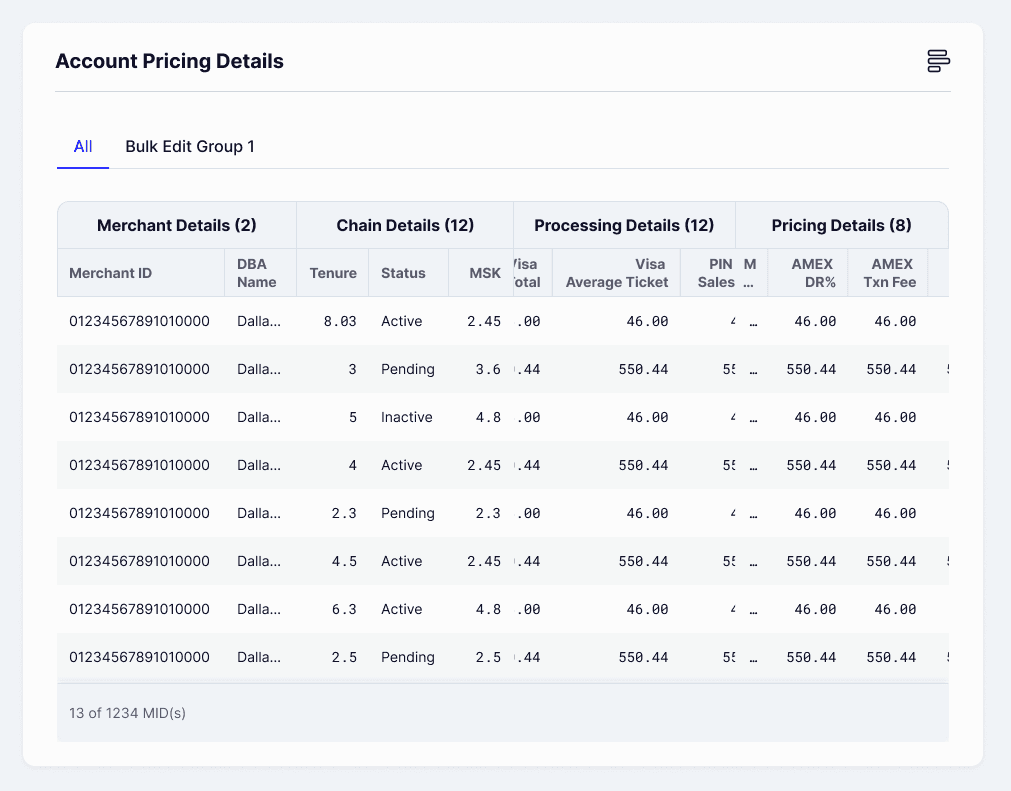
Everytime a bulk edit is performed a new tab appears, visually similar to a folder. This helps to have a certain goal in mind when creating each bulk edit group.


02
Chain Accounts required simultaneous updates and edits to individual fees. Based on salesperson understanding, they would group together accounts belonging to each other and update their fees likewise.
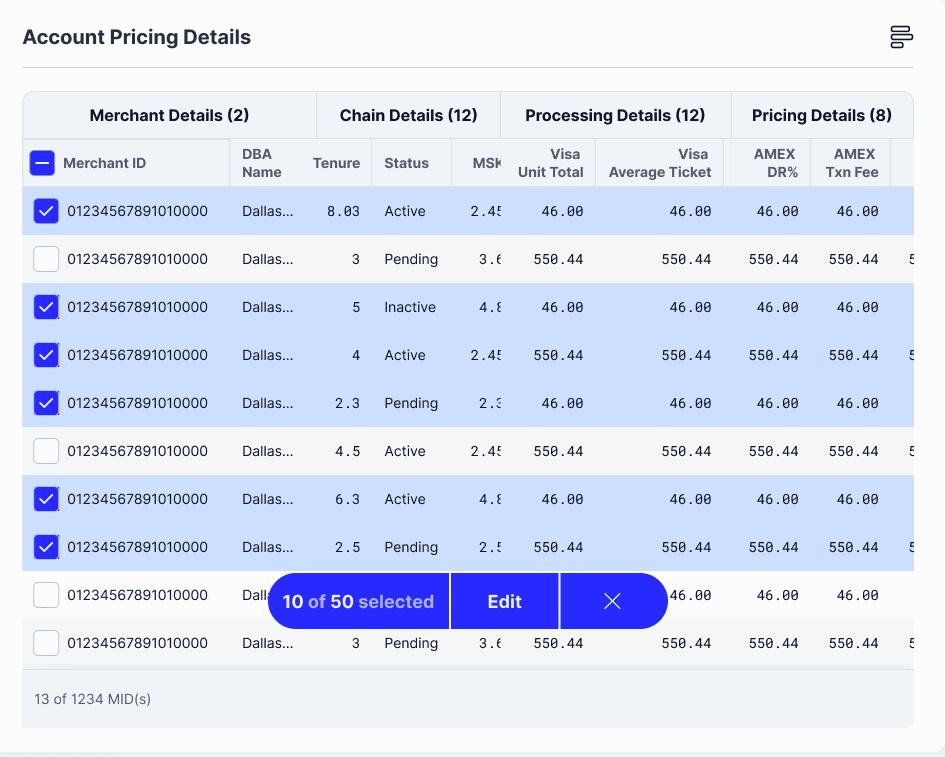
The largest viewable area was given to viewing the merchant IDs. Once the user confirms that all the variables needed have been selected, they can select the edit button.
Once the edit button is clicked, the user can no longer add any more variables. Similar to how we calculated in school,the viewing area decreases, the rough work column appears on the right side, listing out individual parameters that the user can edit all at once.

Changes are saved, and the edits are updated in a new sheet. Users can now compare the before and after as well as compare how it functions as an individual unit and within the whole chain account as well.
The processing totals on the left gives the final result, similar to how in school, once we calculated the answer on the rough column, we wrote/viewed our answers on the left.
Merchant Acquisition And Pricing Rules
There were a lot of pricing rules and business dependencies to consider. Most users would have to spend days after submititng their proposal to determine whether it was accepted before sending it to the merchant.
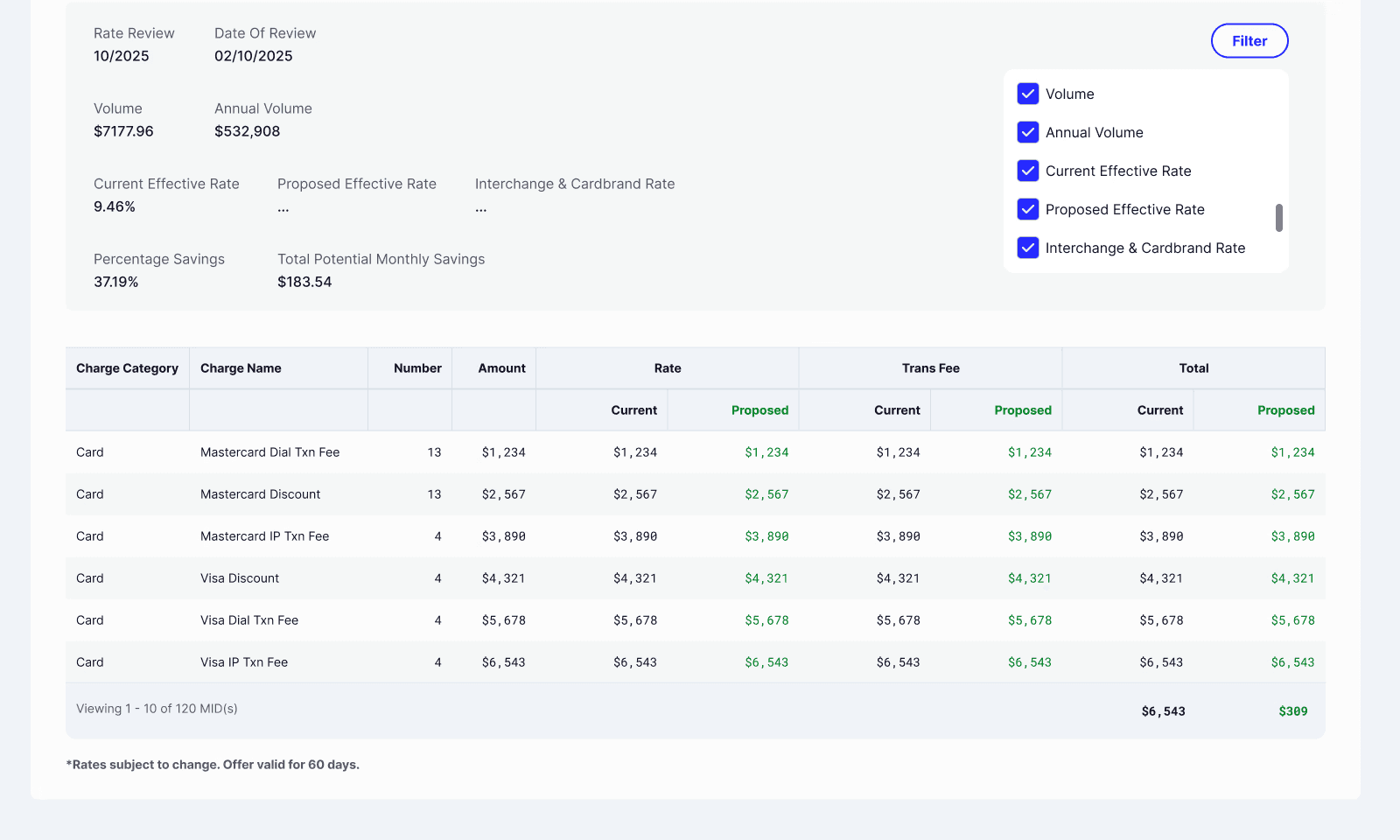
I built the rules into the system, prominently displaying the recommended floor and turning the labels red when any value could not be validated. However, the user could still proceed with the same, overriding the machine with their judgement. External links were placed below to help them navigate the process better.

Once users determined the pricing plan and discussed it with merchants, they can either send it to salesforce for further review or export it to send to merchants.

Results
Future Opportunities
Currently working on incorporating a Surcharging and Cash Discounting Calculator within individual and chain account pricing.
While guardrails improved consistency, recommendation accuracy needs refinement—especially for complex accounts. This highlights an opportunity to strengthen pricing intelligence with richer data inputs.
Attrition is influenced by external market factors, not just pricing. Future iterations should incorporate competitive benchmarking and customer sensitivity signals.